


Engelsberg Ideas
5.01.00 Reviews
App Specs
- Version
- 1.4
- Updated On
- License
- Free
- Downloads
- 10,000+
- Developer
- Engelsberg Ideas
- Categories
- News & Magazines
- Platform
- Android
Screenshots


 Analysis by AppCompare
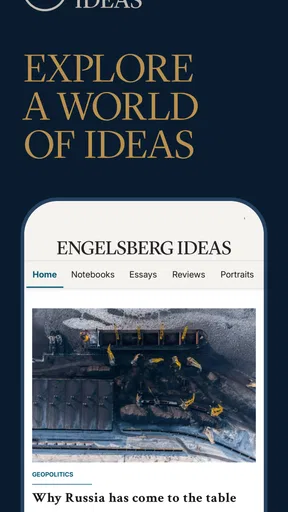
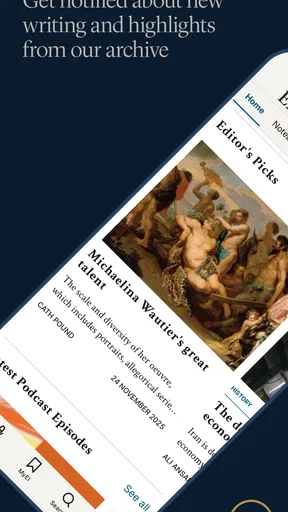
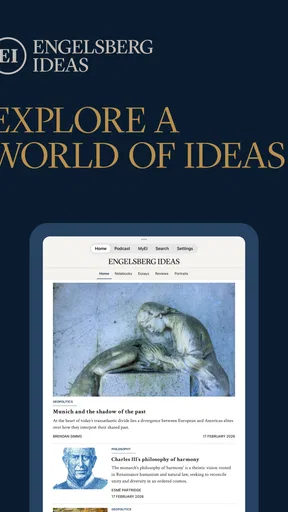
I approached Engelsberg Ideas as a reading and listening companion rather than as a fast headline feed. That distinction matters. This free News & Magazines app from Engelsberg Ideas focuses on essays, analysis and podcasts connected to history, geopolitics and culture, so its value comes from giving me time to think rather than pushing a constant stream of short updates. After spending time with it, I see a thoughtful option for readers who want context and interpretation, especially when a news story feels too large or complicated to understand from brief summaries alone.
The app is available to everyone, and its broad subject range makes it suitable for curious readers with very different interests. I can move from historical ideas to international affairs and then to cultural discussion without changing apps or searching through unrelated entertainment. At the same time, that breadth means this is not the best choice for someone who only wants breaking headlines, local reporting or a highly personalized daily news briefing. Its identity is closer to a digital magazine with audio elements than to a conventional news alert service.
How the reading experience supports different users
I look at this section through a practical question: what makes the same collection useful to a reader who prefers sustained text, someone who learns more easily by listening, or a person balancing attention and accessibility needs? The answer is less about one format being universally best and more about choosing a comfortable way into the material. That distinction also helps clarify which readers are most likely to benefit from the app’s deliberate pace.
Readable organization for longer attention
The strongest part of the experience is the way the subject matter invites slower reading. Essays and analysis need more concentration than a headline list, but they also reward readers who want to understand causes, consequences and competing interpretations. I found the app most useful when I opened it with a specific question in mind, such as wanting historical background for a geopolitical issue. That approach made the broad collection feel less overwhelming and helped me choose material with a clear purpose.
Navigation is easier to understand when I treat the app as a collection of ideas rather than as a real-time news dashboard. I look for a subject that interests me, select a piece, and give myself enough time to follow the argument. This is a small but important workflow tip: opening it during a short spare moment can lead to frustration if I expect to finish a substantial essay immediately. It works better as a planned reading break, a weekend browse or a quiet evening activity.
For readers who find rapid news feeds tiring, this slower rhythm can be a genuine advantage. There is less pressure to react instantly, and the themes encourage reflection. Someone who prefers very large text, strong contrast or extensive display customization should check the experience on their own device before committing to regular use, because reading comfort depends heavily on the phone or tablet settings available to them. I would not assume that a serious editorial focus automatically guarantees ideal readability for every person.
I also appreciate that the subject areas are meaningful rather than interchangeable labels. History can provide background, geopolitics can connect events across borders, and culture can show how ideas affect everyday life. The combination gives me more ways to approach a topic. If a political question feels too immediate, a historical essay may make it easier to understand. If a cultural discussion seems isolated, an international perspective may add useful context.
Worth Reading Before You Choose

EA SPORTS FC Mobile 26 Is a Bigger Football Game, but It Takes Time

Flipboard Shows What News Apps Must Do Beyond the Feed

Switching to Android Auto Means Rethinking Your Driving Routine

Google Calendar Makes a Crowded Week Easier to Manage

Ludo King Makes the Most of the Minutes Between Plans

Baby Panda World Brings Quick Play to Modern Phones, but Its Game Library Feels Busy
Audio as an alternative route into the material
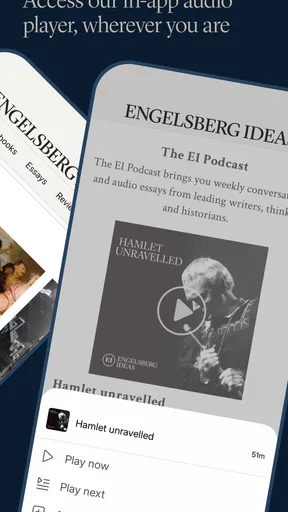
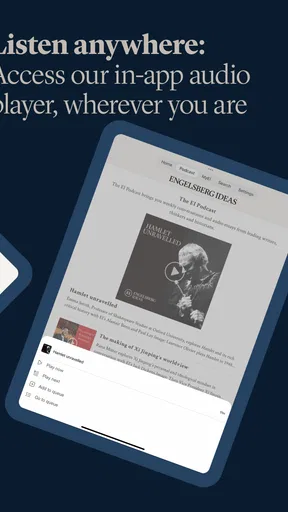
The podcast element gives the app a second way to engage with its content. This matters for people who struggle with extended on-screen reading, experience visual fatigue, or simply absorb ideas more comfortably through listening. I can imagine using it while preparing a meal, walking somewhere familiar or taking a break from a bright display. That flexibility makes the app more practical than a publication that only offers written articles.
Audio is not automatically accessible in every situation, though. A noisy commute, shared room or environment where sound is inappropriate can make listening difficult. For that reason, I would treat podcasts as a useful complement rather than a complete replacement for text. The best personal workflow may be to listen when attention is divided only lightly, then return to written material when a subject requires close examination or note-taking.
There is also a trade-off between listening and reading for people who need precise control over information. Text usually makes it easier to scan backward, compare paragraphs and locate a particular idea. Audio can feel more natural, but finding one detail may take more effort. I would choose the format according to the task: podcasts for orientation and broad understanding, essays for careful reference and analysis.
Useful in ordinary routines, but not as an emergency news tool
A realistic everyday use would be a reader who sees a complicated international story during the day and does not want to rely on several disconnected short posts. In the evening, that person could open the app, choose related analysis, and use the podcast format when their eyes are tired. The next morning, the written version could help them revisit a key argument. That two-stage routine is more valuable than simply consuming another headline and forgetting it a few minutes later.
The app also suits students, lifelong learners and people preparing for informed conversations. I would use it before a discussion about a historical event or a current geopolitical question, not because one essay can settle the issue, but because a well-developed argument can reveal what background I am missing. A useful habit is to write down one claim I agree with and one question it raises. That prevents passive scrolling and turns the app into a starting point for independent thinking.
However, I would skip it when my immediate need is practical news. If I want weather information, local transport updates, quick sports results or a rapid summary of developing events, a dedicated service is more appropriate. This app’s strength is depth and perspective, not speed. Comparing it with a standard news aggregator makes that clear: an aggregator is better for breadth and urgency, while Engelsberg Ideas is better when I want selected ideas to stay with me longer.
Motor and sensory considerations in real use
For users with limited hand movement, the most comfortable approach will depend on the device and operating-system settings they already use. Longer reading sessions can reduce the need for constant rapid interaction, which is helpful compared with endlessly refreshing a feed. I can open one piece, settle into it and avoid repeated switching between small items. On the other hand, anyone who finds scrolling, tapping small controls or returning to a previous item difficult should test those actions personally before making the app part of a daily routine.
Voice control, screen magnification, display scaling and other built-in phone tools may improve the experience for some users, but I would not present them as special functions of the app itself. Their usefulness depends on the operating system, the device and the person’s preferences. This is one reason I see the minimum operating-system requirement of Android 8.0 as relatively approachable for people using older compatible phones. Still, compatibility alone does not tell me whether every interaction will feel equally comfortable.
People who are sensitive to visual stimulation may prefer the focused nature of an essay over a busy stream of constantly changing headlines. Likewise, someone with attention difficulties may benefit from choosing one topic and completing it before moving on. The opposite can also be true: a long argument may be harder to manage than short, clearly separated updates. I would begin with shorter listening or reading sessions, then increase the length only if the format feels manageable.
For hearing-impaired users, the practical question is whether the written material provides enough of the same substance as the podcasts. Since the app includes essays as well as audio, it is not dependent on listening alone, which is a meaningful advantage. For visually impaired users, audio may be the more comfortable route, but the quality of their experience will still depend on how well their device’s accessibility tools interact with the app. I would describe the app as offering multiple content formats, not as having a guaranteed accessibility solution for every need.
Situational access and attention management
The app fits quiet settings particularly well. I can imagine using it at home, in a library or during a planned break when I have enough attention for a sustained argument. It is less suitable when I am crossing a busy street, handling equipment or trying to monitor several things at once. Podcasts may be easier than reading in some situations, but serious analysis still deserves more attention than background entertainment.
One of my favorite practical approaches is to separate discovery from study. During a short break, I can identify a subject that seems relevant. Later, when I have more time, I can return to it and read or listen without trying to absorb everything immediately. This reduces cognitive pressure and makes the broad scope feel more manageable. It is also a good way to avoid confusing exposure to a topic with genuine understanding.
Travel can produce mixed results. The audio format may be convenient when I am moving around, but listening in public depends on noise, privacy and the availability of a suitable environment. Written essays can work offline only if the app supports that behavior, and I would not assume it without checking the current version directly. For users who need guaranteed access during flights or unreliable connections, this is an important practical point to verify before relying on it as their main reading source.
The free price removes a major barrier to trying it. I can explore the editorial approach without making a financial commitment, which is especially helpful for students or readers who are unsure whether long-form analysis suits them. The audience response is also encouraging: the app has a 5.0 average from around 148 ratings and has passed 10,000 installs. Those figures suggest a small but very positive user base, although I would still judge the experience against my own needs rather than treating the rating as proof of universal accessibility.
Where the experience still has limits
The app’s focused editorial identity can feel narrow if I expect a complete replacement for a general news service. History, geopolitics and culture are substantial subjects, but they do not cover every practical information need. I would keep another source for urgent updates and routine local information. Using this app alongside a fast news service makes more sense to me than asking it to perform both jobs.
Long-form content can also create a barrier for readers with limited time, low energy or difficulty sustaining attention. The very depth that makes an essay rewarding can make it inaccessible during a rushed day. My workaround is to choose one piece rather than browsing indefinitely, and to use audio when the screen is uncomfortable. Even then, the app will not suit someone who wants every item reduced to a few quick sentences.
Another limitation is interpretive rather than technical. Essays and analysis present viewpoints, and a persuasive argument can feel complete even when a subject remains contested. I recommend treating each piece as an informed lens, not as the only possible account. For sensitive political or historical questions, I would compare the ideas with other reputable sources. That habit is especially important for readers using the app for study, teaching or public discussion.
New users may also need time to understand what they want from the collection. A conventional news app often tells me what is newest or most popular. A reflective publication asks me to choose what deserves attention. That is rewarding once I adopt the right mindset, but it can feel less immediately obvious. I would not recommend it to someone who dislikes browsing or wants an algorithm to make every decision for them.
Development, maturity and device fit
Engelsberg Ideas is developed by Engelsberg Ideas, and the app is currently at version 1.4. It was released on February 18, 2026, so I see it as a relatively young product with room to develop. That does not make it unsuitable, but it does affect how I evaluate it: I pay close attention to everyday stability, navigation clarity and whether the reading and listening experience feels polished enough for repeated use.
Its support for Android 8.0 or later gives it a reasonable reach across compatible devices. That is helpful for readers who do not replace their phones frequently. Still, older hardware can differ widely in screen quality, responsiveness and audio performance. A person with an older phone should try a full reading session and a podcast session before deciding whether it is comfortable, rather than judging compatibility from the operating-system requirement alone.
The age rating of Everyone also makes the app approachable for a broad household audience. That label is useful for basic suitability, but it does not mean every historical or geopolitical subject will feel emotionally light. Adults choosing it for younger readers should still consider the maturity of individual topics and use the material as an opportunity for conversation when appropriate.
Who should install it, and who should choose something else?
I would recommend the app to readers who enjoy arguments that unfold over time, want more context around international affairs, or like moving between written essays and podcasts. It is especially appealing to someone who feels dissatisfied with headline-only coverage and wants a calmer way to build background knowledge. The free access makes experimentation easy, and the combination of subjects gives curious readers several entry points.
I would be more cautious about recommending it to someone who needs local alerts, instant updates, highly personalized feeds or a large collection of accessibility controls built directly into the product. A general news aggregator, a dedicated audio platform or a service designed around local information may be better in those situations. The right choice depends less on whether the app is good in isolation and more on whether its deliberate pace matches the user’s routine.
For inclusive use, I would start with a simple personal test: read one essay in the preferred display settings, try a podcast in a normal listening environment, and notice how much effort navigation requires. Then I would decide whether the app works as a primary source, a supplementary learning tool or an occasional source of thoughtful material. That test is more revealing than a generic accessibility claim because it accounts for vision, hearing, movement, attention and context together.
A thoughtful option with a specific purpose
My overall impression is positive, but it is positive for a particular reason. Engelsberg Ideas does not win me over by trying to be everything at once. It offers a focused place for history, geopolitics and culture, with essays and podcasts that encourage me to slow down and connect ideas. That makes it a useful companion to faster news tools, not necessarily a replacement for them.
The most inclusive way to use it is to match the format to the reader and the moment. Choose text when scanning and revisiting details matter, audio when the screen is tiring or inconvenient, and a different service when urgency or local information comes first. Users who need extensive built-in customization should test it carefully, while those comfortable with their device’s own accessibility settings may find the flexible content formats helpful.
At no cost and with an Everyone rating, it is easy to try without much risk. I would keep it on my device if I wanted a more reflective alternative to rapid news consumption, particularly for evening reading or purposeful background research. I would not open it expecting a complete daily news utility. Used on its own terms, it offers a calm, intellectually focused experience that can serve different abilities and routines, provided readers are willing to adapt the pace and choose the format that genuinely works for them.
Pros
- Clear explanations make complex ideas easier to understand.
- Useful for exploring new perspectives and creative thinking.
- Clean presentation helps users focus on the main concepts.
- Suitable for quick reading during short breaks.
- Can inspire discussion
- reflection
- and follow-up research.
Cons
- Some topics may feel too brief for users seeking deep analysis.
- The content may not appeal to readers who prefer practical examples.
- Ideas can be subjective and may encourage differing interpretations.
- Limited interactive features could reduce long-term engagement.
- Users may need external sources to verify or expand on certain claims.
FAQs for Engelsberg Ideas
What is Engelsberg Ideas?
Engelsberg Ideas is a digital platform focused on essays, commentary, and long-form thinking about history, politics, culture, science, and society. Its content is designed for readers who enjoy carefully argued perspectives from writers and academics. Rather than functioning like a fast-news app, it emphasizes depth, context, and intellectual discussion, making it better suited to thoughtful reading than quick updates.
Is Engelsberg Ideas free to use?
Access to Engelsberg Ideas may depend on the specific content, platform, and subscription options available at the time you visit. Some articles or features can be available without payment, while other material may be reserved for subscribers or supporters. Before downloading or registering, check the current pricing, access rules, and whether recurring billing applies to any selected membership.
What kind of content can I read on Engelsberg Ideas?
The platform covers a broad range of subjects, including historical events, international affairs, philosophy, literature, art, technology, and contemporary political questions. Articles are generally written as essays rather than short news reports, so readers can expect detailed explanations and individual viewpoints. The range of contributors also means the tone and complexity may vary from one piece to another.
Is Engelsberg Ideas suitable for casual readers or students?
Engelsberg Ideas can be useful for both casual readers and students, although it is most appealing to people who enjoy longer, analytical articles. Students may find the historical and cultural essays helpful when developing background knowledge or research ideas, but the content should not automatically be treated as an academic source. Always verify important claims and consult original references when using material for coursework.
Does Engelsberg Ideas offer a good reading experience on mobile devices?
The mobile reading experience is generally intended for comfortable access to essays and articles on a smaller screen, with a layout focused on text rather than distracting features. Your experience can still depend on the device, browser or app version, screen size, and internet connection. If offline reading, notifications, account synchronization, or accessibility tools are important to you, review the current platform features before installing.


